Building a microservice application with k8s!
I'll start with a brief overview (not a deep dive) of the microservice application I built. I took a monolithic architecture and transformed it into a lightweight, modular microservice setup.
Tech Stack:-
Next.js 15, Node.js, Prisma, PostgreSQL, Redis, MongoDB, NATS, Docker, Kubernetes, GCP
Overview of the application:-
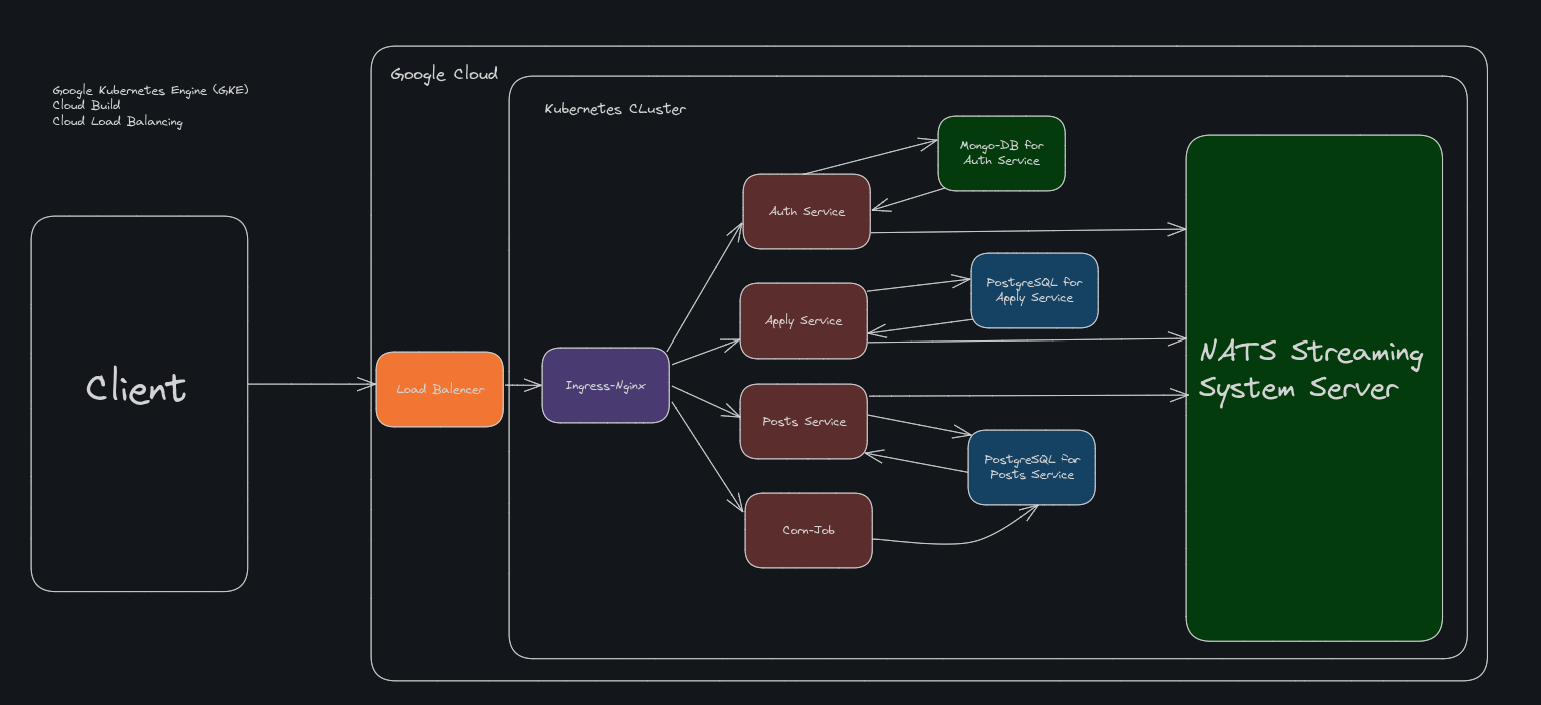
Architected a scalable microservices system using a one-database-per-service design for strong service isolation and maintainability.
Developed a centralized authentication service using HTTP-only cookies for session management across services.
Applied polyglot persistence, leveraging PostgreSQL and MongoDB based on specific service requirements.
Integrated NATS Streaming as a cloud-native event bus for reliable, asynchronous inter-service communication.
Created Kubernetes CronJobs to automatically clean up expired posts, optimizing database and resource usage.
Designed and deployed multi-stage Docker containers for lean production builds and pushed them to Google Kubernetes Engine (GKE), Google Cloud Build, Google Cloud Storage, etc.
Automated the CI/CD pipeline using GitHub Actions to streamline testing, building, and deployment workflows.
Github Repo:-
Architecture:
Service list and tech stack:
| Index No. | Folder | Services | Tech Stack |
| 1 | apply | Feature to apply for referrals | Node.js, Express.js, NATS Streaming, Prisma, PostgreSQL |
| 2 | auth | Centralised authentication service | Node.js, Express.js, NATS Streaming, Mongoose, MongoDB |
| 3 | client | Front-end | Next.js 15, TailwindCSS, Shadcn, React Query |
| 4 | payments | Payment Service | Stripe, Node.js, Express.js, NATS Streaming, Prisma, PostgreSQL |
| 5 | posts | To create or update posts | Node.js, Express.js, NATS Streaming, Prisma, PostgreSQL |
| 6 | posts-cleanup-corn | Cron Job to delete expired posts | Node.js, Express.js, NATS Streaming, Prisma, PostgreSQL |
Kubernetes Features used
| Feature | Info. |
| Pods | The smallest deployable units in Kubernetes are used to run microservices. |
| ReplicaSets | Used to ensure that a specified number of pod replicas are running at any given time. |
| Deployments | Used to manage the deployment of microservices, ensuring they are running and updated. |
| Services | Used to expose microservices and enable communication between them. |
| Ingress-Nginx Controller | Used to manage external access to the microservices, routing traffic to the appropriate services. |
| Jobs | Used to run one-time tasks, such as database migrations or data processing. |
| CronJobs | Used to schedule recurring tasks, such as cleaning up expired posts in the posts-cleanup-corn service. |
| ConfigMaps | Used to manage configuration data for microservices, such as environment variables. |
| Secrets | Used to manage sensitive information, such as API keys and database credentials. |
| Persistent Volumes | Used to manage persistent storage for microservices, such as databases. |
| Resource Quotas | Used to limit the resources (CPU, memory) that microservices can consume within a namespace. |
Flow of the Microservice Application:
The user signs up through the Auth service, which handles authentication and session management.
Upon successful signup, the Auth service emits an
UserCreatedevent, and the Post service listens to this event and creates a replica of the user in its database for user-post ownership reference.The user is redirected to the home page, where job posts are fetched from the Post service.
When a user creates a job post, the Post service emits an
PostCreatedevent, and the Apply service consumes this event and creates a replica of the post (with partial data) in its database to support job applications.When a user applies for a post, the Apply service creates a new application record in its database, and the Apply service then emits an
PostAppliedevent.The Post service listens to this event and increments the
totalAppliedcount for the respective post in its database.A Kubernetes CronJob triggers every month and runs a task in the Post service to delete all job posts past their expiration date.
Published a reusable shared package to the NPM registry containing common utilities such as NATS event definitions, base listeners/publishers, and custom Express error handlers, enabling consistent and maintainable communication patterns across all microservices.
Implemented post update in the Post service using optimistic concurrency control with a
versionfield to prevent race conditions caused by multiple pods handling the same event. Ensured transactional safety using Prisma$transactionto maintain data consistency during concurrent updates.Example:-
router.put(
  "/api/posts/:id",
  requireAuth,
  async (
    req: Request<{ id: string }, {}, UpdatePostRequestBody>,
    res: Response
  ) => {
    const { description, accept, expiresAt, stars, version } = req.body;
    const { id } = req.params;

    // Use a database transaction to ensure atomicity and maintain consistency during the update process
    const result = await prisma.$transaction(async (tx) => {
      // Fetch the post with the specified ID and version (optimistic concurrency control check)
      const post = await prisma.posts.findUnique({
        where: { id: id, version },
      });

      // If no post is found, it might be due to an outdated version or invalid ID
      if (!post) {
        throw new Error("Post not found");
      }

      // Ensure that only the owner of the post can perform the update
      if (post.userId !== req.currentUser!.id) {
        throw new NotAuthorizedError();
      }

      // Attempt to update the post only if the version matches (OCC guard)
      const { count } = await tx.posts.updateMany({
        where: { id, version: post.version }, // Guard against concurrent writes using version field
        data: {
          description,
          accept,
          expiresAt,
          stars,
          version: { increment: 1 }, // Increment version to signal state change
        },
      });

      // If no rows were updated, the version is outdated — another process has already modified the post
      if (count === 0) {
        throw new Error("Version conflict – please reload and try again");
      }

      // Return the updated post after a successful transactional update
      return tx.posts.findUnique({ where: { id } });
    });

    // Publish a PostUpdated event to notify other services of the change
    await new PostUpdatedPublisher(natsWrapper.client).publish({
      id: result!.id,
      description: result!.description,
      version: result!.version,
    });

    // Send the updated post back in the HTTP response
    res.status(200).send(result);
  }
);
Now What ?
Of course, if I were to explain every feature or detail of what I’ve built, it would span across multiple blog posts. So instead, I’ll focus on the most important or challenging parts I encountered along the way.
Contents
Client Data Fetching on Client & Server Component ( Next.js 15 )
Docker Images of Node.js and Prisma
Kubernetes YAML file for Node.js and Prisma
Corn job
Client Data Fetching
 import axios from "axios";

 export const client = axios.create({
   baseURL:
     typeof window === "undefined"
     // For server components
       ? process.env.NODE_ENV === "production"
         ? "http://your-prod-domain.com"
         : "http://ingress-nginx-controller.ingress-nginx.svc.cluster.local"
     // For client components
       : "/",
   withCredentials: true,
 });

 // Optional: dynamically inject host header in Node
 if (typeof window === "undefined") {
   client.interceptors.request.use((config) => {
     config.headers?.set?.("Host", "refhired.dev");
     return config;
   });
 }
Client Component :-
 // Client component
 "use client";

 import { client } from "@/lib/axios";
 import { useQuery } from "@tanstack/react-query";

 export default function ClientPage() {
   const { data } = useQuery({
     queryKey: ["client"],
     queryFn: () => {
       return client.get("/api/likes/client");
     },
   });

   return <div>ClientPage {data?.data?.data}</div>;
 }
Server Component :-
In Next.js 15, every server component is statically rendered. Without
const dynamic = "force-dynamic"directive, Next.js tries to statically pre-render the page at build time (ISR or SSG).Build-time environment does not:
Run inside the Kubernetes cluster
Allow requests to the internal service DNS
Permit forbidden headers like
Hostviafetch(though Axios works here)
So, even with Axios, the host cannot be resolved, and the call fails during the build step.
    // Server component
    export const dynamic = "force-dynamic";

    import { client } from "@/lib/axios";

    async function fetchPosts() {
      const response = await client.get("/api/likes/server");
      return response?.data;
    }

    export default async function ServerPage() {
      const data = await fetchPosts();

      return <div>ServerPage {data?.data}</div>;
    }
Docker Images of Node.js and Prisma
This Dockerfile uses a multi-stage build to efficiently create a lightweight production image for a Node.js app that uses Prisma as its ORM. The first stage (
builder) installs necessary build tools, includinglibc6-compatThis is crucial for Prisma because its native engine binaries rely on glibc compatibility, something Alpine Linux doesn't provide out of the box. It installs all dependencies, generates Prisma client code, and builds the app.The second stage (
prod-deps) installs only production dependencies to keep the runtime image slim.Finally, the
runtimestage copies the built app, production dependencies, and the generated Prisma client (including native binaries from.prisma) into a fresh Alpine image. This strategy results in a much smaller final image, optimized for performance and security in production environments.# --- Builder --- FROM node:24.1.0-alpine AS builder WORKDIR /app RUN apk add --no-cache openssl libc6-compat COPY package.json yarn.lock ./ RUN yarn install --frozen-lockfile COPY prisma ./prisma RUN npx prisma generate # generate prisma COPY . . RUN yarn build # builds to /app/build # --- Prod dependencies only --- FROM node:24.1.0-alpine AS prod-deps WORKDIR /app COPY package.json yarn.lock ./ RUN yarn install --production --frozen-lockfile # --- Runtime --- FROM node:24.1.0-alpine AS runtime WORKDIR /app RUN apk add --no-cache openssl libc6-compat ENV NODE_ENV=production COPY --from=prod-deps /app/node_modules ./node_modules COPY --from=builder /app/build ./build COPY --from=builder /app/prisma ./prisma COPY --from=builder /app/node_modules/.prisma ./node_modules/.prisma CMD ["node", "build/index.js"]Kubernetes YAML file for Node.js and Prisma
This Kubernetes manifest sets up a PostgreSQL database using a
Deployment, aService, and aPersistentVolumeClaim(PVC) for data persistence. TheDeploymentruns a single replica of the officialpostgrescontainer, configured via environment variables for the database name, user, and password. It mounts a volume at/var/lib/postgresql/datausing a named PVC (posts-pg-pvc), ensuring data persists even if the pod restarts. TheServiceof typeClusterIPexposes the database internally within the cluster at port5432, allowing other services to connect using theposts-pg-srvDNS name. Lastly, the PVC requests 100MB of storage withReadWriteOnceaccess mode, ensuring the database has dedicated persistent storage for its data. This setup provides a reliable, isolated, and stateful database service within a Kubernetes environment.
apiVersion: apps/v1
kind: Deployment
metadata:
  name: posts-pg-depl
spec:
  replicas: 1
  selector:
    matchLabels:
      app: posts-pg
  template:
    metadata:
      labels:
        app: posts-pg
    spec:
      containers:
        - name: posts-pg
          image: postgres
          env:
            - name: POSTGRES_DB
              value: "db"
            - name: POSTGRES_USER
              value: "postgres"
            - name: POSTGRES_PASSWORD
              value: "postgres"
          volumeMounts:
            - name: posts-pg-pvc
              readOnly: false
              mountPath: /var/lib/postgresql/data
      volumes:
        - name: posts-pg-pvc
          persistentVolumeClaim:
            claimName: posts-pg-pvc
---
apiVersion: v1
kind: Service
metadata:
  name: posts-pg-srv
spec:
  selector:
    app: posts-pg
  type: ClusterIP
  ports:
    - name: db
      protocol: TCP
      port: 5432
      targetPort: 5432
---
apiVersion: v1
kind: PersistentVolumeClaim
metadata:
  name: posts-pg-pvc
spec:
  accessModes:
    - ReadWriteOnce
  resources:
    requests:
      storage: 100M
This Kubernetes configuration defines a Deployment and Service for a microservice named posts. A key highlight is the use of an initContainer, which ensures that database migrations are applied before the main application starts. The initContainer waits for the PostgreSQL service (posts-pg-srv) to be ready using nc (netcat), and then runs npx prisma migrate deploy to apply any pending Prisma schema migrations to the database. This guarantees the database is in the correct state before the app begins serving requests. The main posts container runs the actual application, pulling its Docker image and injecting necessary environment variables, including database URL, JWT secret, and NATS messaging configuration. The Service named posts-srv exposes this app internally within the cluster on port 3000, allowing other services to communicate with it. This approach ensures reliable startup sequencing and a consistent schema for the app.
In most cases, you do not need an initContainer for MongoDB, especially if you're using an official MongoDB driver (like Mongoose in Node.js) that automatically handles reconnection and waits for the database to be available.
Here's why:
MongoDB clients like Mongoose are resilient — they will try to connect repeatedly until the database is reachable.
MongoDB is schemaless, so there’s no migration step like Prisma for Postgres, meaning you don’t need to "prepare" the DB with schema definitions ahead of time.
Any required setup (like creating indexes or seed data) can usually be done inside the main application startup logic using
once('open', ...)or similar event listeners.
apiVersion: apps/v1
kind: Deployment
metadata:
  name: posts-depl
spec:
  replicas: 1
  selector:
    matchLabels:
      app: posts
  template:
    metadata:
      labels:
        app: posts
    spec:
      initContainers:
        - name: migrate
          image: <your-dockerhub-id>/posts
          command:
            [
              "/bin/sh",
              "-c",
              "until nc -z posts-pg-srv 5432; do echo '⏳ Waiting for Postgres...';
               sleep 2; done && npx prisma migrate deploy",
            ]
          env:
            - name: DATABASE_URL
              value: "postgresql://postgres:postgres@posts-pg-srv:5432/db?schema=public"
      containers:
        - name: posts
          image: <your-dockerhub-id>/posts
          env:
            - name: JWT_KEY
              valueFrom:
                secretKeyRef:
                  name: jwt-secret
                  key: JWT_KEY
            - name: PORT
              value: "3000"
            - name: DATABASE_URL
              value: "postgresql://postgres:postgres@posts-pg-srv:5432/db?schema=public"
            - name: NATS_URI
              value: "nats://nats-srv:4222"
            - name: NATS_CLUSTER_ID
              value: "your_clustername"
            - name: NATS_CLIENT_ID
              valueFrom:
                fieldRef:
                  fieldPath: metadata.name
---
apiVersion: v1
kind: Service
metadata:
  name: posts-srv
spec:
  selector:
    app: posts
  type: ClusterIP
  ports:
    - name: posts
      protocol: TCP
      port: 3000
      targetPort: 3000
Corn job
This Kubernetes
CronJobconfiguration defines a scheduled task nameddelete-expired-poststhat runs monthly on the 1st at midnight (as specified byschedule: "0 0 1 * *") in the Asia/Kolkata time zone. The job runs a single container from the image<your-dockerhub-id>/posts-cleanup-corn, which is likely responsible for cleaning up expired posts from a PostgreSQL database (connected via theDATABASE_URLenvironment variable). TheconcurrencyPolicy: Forbidensures that a new job won’t start if the previous one is still running. The system keeps a history of the last 3 successful and 3 failed jobs for debugging or auditing. If the job fails, Kubernetes will attempt a restart, as indicated byrestartPolicy: OnFailure.
Note: You don't need to create a separate database replica just for the cron job — it's unnecessary and adds complexity without benefit. Since I'm using Prisma, I simply reused the same Prisma schema (or included only the required models) in the cron job image. Prisma automatically connects to the main database using the DATABASE_URL provided in the environment variables, making the setup clean and efficient without duplicating database infrastructure.
apiVersion: batch/v1
kind: CronJob
metadata:
  name: delete-expired-posts
  labels:
    app: posts-cleanup
spec:
  schedule: "0 0 1 * *" # Every Month
  timeZone: "Asia/Kolkata"
  concurrencyPolicy: Forbid
  successfulJobsHistoryLimit: 3
  failedJobsHistoryLimit: 3
  jobTemplate:
    spec:
      template:
        spec:
          containers:
            - name: cleanup
              image: <your-dockerhub-id>/posts-cleanup-corn
              env:
                - name: DATABASE_URL
                  value: "postgresql://postgres:postgres@likes-pg-srv:5432/db?schema=public"
          restartPolicy: OnFailure
The corn job file is:-
import { PrismaClient } from "@prisma/client";

const prisma = new PrismaClient();

 async function main() {
   const now = new Date().toISOString();

   const { count } = await prisma.posts.deleteMany({
     where: {
       expiresAt: {
         lt: now, // delete if expired
       },
     },
   });
   console.log(`🧹 Deleted ${count} expired posts as of ${now}`);
   await prisma.$disconnect();

}

main().catch((e) => {
  console.error("❌ Error deleting expired posts:", e);
  process.exit(1);
});
The Diockerfile will look like this
# ─────────────────── Build stage ────────────────────────
FROM node:24.1.0-alpine AS build
WORKDIR /app

# 1) System libs Prisma needs to detect OpenSSL + glibc symbols
RUN apk add --no-cache openssl libc6-compat

# 2) Install production dependencies first (best layer cache)
COPY package*.json ./
RUN npm ci --omit=dev

# 3) Dev‑only tools to transpile TypeScript
RUN npm install --save-dev typescript

# 4) Generate the Prisma client (now that OpenSSL is present)
COPY prisma ./prisma
RUN npx prisma generate

# 5) Compile TypeScript → dist/
COPY tsconfig.json ./
COPY cron ./cron
RUN npx tsc

# ─────────────────── Runtime stage ──────────────────────
FROM node:24.1.0-alpine
WORKDIR /app
ENV NODE_ENV=production

# Same two runtime libraries Prisma needs inside the container
RUN apk add --no-cache openssl libc6-compat

# Copy node modules (contains Prisma engine), compiled code, and schema
COPY --from=build /app/node_modules ./node_modules
COPY --from=build /app/node_modules/.prisma ./node_modules/.prisma
COPY --from=build /app/dist ./dist
COPY --from=build /app/prisma ./prisma

CMD ["node", "dist/expirePosts.js"]


