Inside Tweakleaf Engineering

Hi ! 👋👋
Live Link:- https://tweakleaf.com/
GitHub Link:- https://github.com/sayandedotcom/tweakleaf
Demo Video:- https://youtu.be/620GRWeRDts?si=_wQxqf3-AY0Q8VIi
Tweakleaf is a simple web app that tweaks your LaTeX resume and cover letters according to the job description, allowing you to apply to hundreds of jobs with proper optimizations in just 10 minutes. The users can chat with AI to tweak their document.
Tech Stack:-
Dev:- TypeScript, Python, Next.js, TailwindCSS, FastAPI, LangChain, LangGraph, LangSmith, PostgreSQL
LLMs:- OpenAI, Google Gemini Flash
Deployement:- SST, Docker, AWS Lambda, EC2, ALB, Route53, CloudWatch
Main Features
Time - Give a job description and download a resume/cover letter in ~10 seconds.
LaTeX Support - Use LaTeX to write your resume and cover letters, ensuring ATS compatibility.
Humanized Text - Generates content that is indistinguishable from human-written text, ensuring detectability with ATS.
ATS Optimization - AI is designed to generate content that is aware of ATS, ensuring high rankings.
Multiple Models - We provide support for multiple models for your resume and cover letters.
Prompts - We use prompts that are gathered from experts and different sources that have proven to have a high ATS ranking.
Video
Our dashboard!
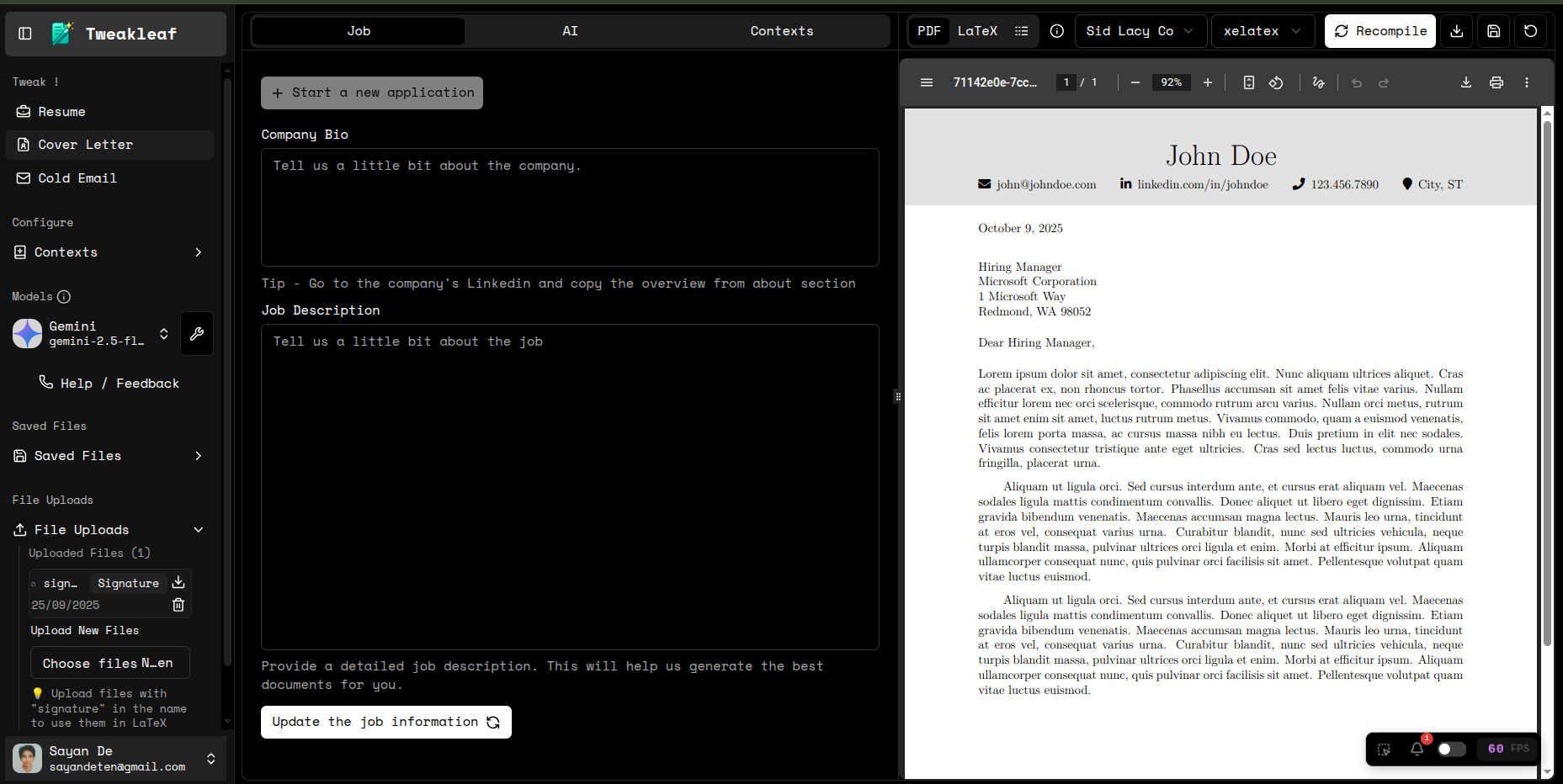
Some AI Engineering hacks I used to make Tweakleaf more efficient in generating documents.
Developed a self-learning AI agent that adapts dynamically to user preferences. ( This feature is currently taken off and under modification )
Developed a self-learning AI Agent using LangGraph by introducing a starting node that processes user messages. A lightweight, small-parameter LLM determines whether to append or ignore each message. If the output is append, the message is stored in the user context ( in a database ); otherwise, execution continues to the next node.
Structured output ensures the LLM strictly returns only append or ignore.
While effective, this approach increased latency and token usage, so I temporarily disabled it.
 system_prompt_to_update_user_context_for_coverletter = """
 You are a context analyzer for a cover letter tweaking system. Determine if user messages contain valuable information for future cover letter conversations.

 **APPEND** messages that contain:
 - Writing style preferences (formal, casual, technical, creative)
 - Tone adjustments (more professional, less formal, confident, humble)
 - Content preferences (emphasize technical skills, add soft skills, focus on achievements)
 - Industry-specific requirements or terminology
 - Company-specific information or culture details
 - Personal information relevant to cover letters (experience, skills, achievements)
 - Corrections or clarifications to previous information
 - Specific requirements they want remembered for future cover letters
 - Feedback on previous responses that shows writing preferences

 **IGNORE** messages that are:
 - Simple acknowledgments ("ok", "thanks", "yes", "no", "good")
 - Pure formatting requests without context ("make it bold", "change font size")
 - Greetings without personal information ("hello", "hi")
 - Generic responses ("that's good", "I see", "alright")
 - Repetitive information already established
 - Temporary/one-time requests with no future relevance
 - Basic task requests without personal context ("create a cover letter", "start over")

 **Examples:**
 - "Make the tone more professional" → APPEND
 - "I prefer technical language" → APPEND
 - "Add more emphasis on my leadership experience" → APPEND
 - "This company values innovation, mention my startup experience" → APPEND
 - "Make it shorter" → APPEND (shows preference for brevity)
 - "Thank you" → IGNORE
 - "Create a new cover letter" → IGNORE
 - "Yes, that looks good" → IGNORE
 - "Make the font bigger" → IGNORE

 User message: {user_message}

 Output: Append or Ignore
 """.
Reduced LLM latency by 80% and costs by 90% through intelligent routing between weak and strong models.
This is the most impactful feature I implemented; it significantly reduced both cost and latency.
LLM routing directs queries to the most suitable model based on task, cost, speed, or accuracy, optimizing performance across services.
Popular services providing LLM routing include:RouteLLM:- https://github.com/lm-sys/RouteLLM
Cohere’s Rerank + Routing
Microsoft Semantic Kernel
Instead of relying on external tools, which felt like overhead for a small SaaS, I built my own routing mechanism. Using LangGraph, I created a custom node that:
Routes to a strong model for initial tweaking and long (>100 characters) user messages.
Falls back to a weaker, lightweight model for shorter or follow-up tweaks.
This hybrid approach gave me the benefits of LLM routing while keeping infrastructure lean, cost-efficient, and optimized for real-world usage.
        def llm_router(self, state: dict) -> dict:
            """Route to weak or strong LLM based on user message length and existing messages"""
            user_message = state.get("user_message", "")
            message_length = len(user_message.strip())
            provider = state.get("model")
            messages = state.get("messages")

            print(f"🔧 LLM Router - Message length: {message_length} characters")
            print(f"🔧 LLM Router - Existing messages length: {len(messages)} messages")

            # First message (no existing messages) should always use strong model
            if not messages or len(messages) == 0:
                state["llm_type"] = "strong"
                strong_model = ModelFactory.get_strong_model(provider)
                print(f"🔧 First message - Routing to STRONG LLM ({strong_model})")
            elif message_length > 100:
                state["llm_type"] = "strong"
                strong_model = ModelFactory.get_strong_model(provider)
                print(f"🔧 Long message - Routing to STRONG LLM ({strong_model})")
            else:
                state["llm_type"] = "weak"
                weak_model = ModelFactory.get_weak_model(provider)
                print(f"🔧 Short message - Routing to WEAK LLM ({weak_model})")

            return state
In my application, I implemented a custom LLM routing strategy: the initial document generation is handled by a large, high-quality model to ensure strong wording and structure, while subsequent tweaks and refinements are processed by a smaller, lightweight model.
This approach not only reduced latency and costs but also increased application speed, since the most resource-intensive work (initial draft) is optimized for quality, and repetitive adjustments are optimized for efficiency.
Overall, LLM routing saved both time and credits while maintaining output quality.
Optimized LLM for LaTeX code generation using Few-Shot Prompting to ensure syntactic accuracy.
Few-shot prompting guides an LLM by showing a few input-output examples, helping it generalize and produce accurate task-specific responses.
Whenever my LLM generated LaTeX, it often produced incorrect syntax, invalid characters, and inconsistent outputs, prompting alone was unreliable and unpredictable. To solve this, I applied the Few-Shot Prompting technique, providing the model with carefully crafted input–output examples. This significantly improved LaTeX accuracy, stability, and consistency.
 few_shot_latex_system_prompt = """
 **LaTeX SPECIAL CHARACTERS - MUST ESCAPE:**
 - Dollar sign: $ → \$
 - Percent sign: % → \%
 - Ampersand: & → \&
 - Hash: # → \#
 - Underscore: _ → \_
 - Left brace: {{ → \{{}}
 - Right brace: }} → \{{}}
 - Backslash: \ → \textbackslash
 - Examples: 25% → 25\%, C++ & Python → C++ \& Python, $50,000 → \$50,000

 **CRITICAL LaTeX PRESERVATION RULES:**
 - NEVER modify LaTeX document structure, packages, or commands
 - CHANGE only the content of the cover letter, do not change the structure or formatting
 - **ABSOLUTELY DO NOT** modify or simplify line break and start a new line commands
 """
 # Few-shot examples demonstrating proper LaTeX special character handling
 examples = [
     {
         "input": "Please update my cover letter to mention that I increased sales by 25% and worked with C++ & Python.",
         "output": "In my previous role, I successfully increased sales by 25\% through innovative solutions. My technical expertise includes C++ \& Python programming, which I believe aligns well with your requirements."
     },
     {
         "input": "Update the cover letter to mention I worked on a project worth $50,000 and used technologies like C# and .NET.",
         "output": "In my recent role, I led a critical project valued at \$50,000, delivering exceptional results using C\# and .NET technologies. This experience has strengthened my ability to manage complex software development initiatives."
     },
     {
         "input": "Mention that I have 5+ years of experience with JavaScript & React, and I'm available at 90% capacity.",
         "output": "With over 5+ years of experience in JavaScript \& React development, I bring a strong foundation in modern web technologies. I am currently available at 90\% capacity, allowing me to dedicate significant time to this role."
     }
 ]

 # Example prompt template for few-shot learning
 few_shot_latex_prompt_template = ChatPromptTemplate.from_messages([
     ("system", few_shot_latex_system_prompt),
     ("human", "{input}"),
     ("ai", "{output}"),
 ])

 # Few-shot prompt template
 few_shot_latex_prompt = FewShotChatMessagePromptTemplate(
     example_prompt=few_shot_latex_prompt_template,
     examples=examples,
     input_variables=[],
 )
Decreased token usage by 70% and improved response times via Prompt Compression with LLMLingua. ( This feature is currently taken off and under modification )
Prompt compression reduces input length by summarizing while preserving essential context, lowering token usage, cost, and latency.
In my application, processing large prompts (e.g., full LaTeX files) pushed usage to 6000+ tokens on average. By applying prompt compression, I reduced this to around 2000 tokens, significantly improving efficiency.
However, I later removed it. For resume and cover letter generation, prompt compression proved unsuitable because it often stripped away critical keywords, which are essential for ATS (Applicant Tracking Systems) and recruiter relevance. Accuracy and keyword preservation outweighed the benefits of cost and speed, so I reverted to the uncompressed approach.
Minimized hallucinations in job-application conversations by implementing isolated session threads.
Hallucinations in AI chat occur when the model generates false or misleading information that appears confident. A major cause is context window limits; loss of earlier context forces the model to invent continuity.
To mitigate this, I start each tweak chat in a new thread. For every new job description, the chat begins fresh. As a small SaaS, I store chats in memory rather than a database, using LangChain’s
InMemorySavercheckpointer.While further optimizations are possible, this approach strikes a practical tradeoff between accuracy, simplicity, and performance for a small-scale application.
Integrated a LaTeX compiler with a live code editor for dynamic document generation.
This was the most challenging part of the project—no AI coding shortcuts could help. While there are countless coding editors like Monaco, robust LaTeX editors are rare.
To tackle this, I explored Overleaf’s large open-source GitHub repository:
https://github.com/overleaf/overleaf
Tweakleaf’s LaTeX compiler is a minimal 1.5GB implementation, designed for efficiency, unlike Overleaf’s full-scale, large system.
Deployed backend APIs using a hybrid architecture: AI LangChain API on AWS Lambda (serverless) for scalability and a LaTeX compiler API on AWS EC2 behind a load balancer for reliability and performance, optimizing both cost and efficiency.
Tweakleaf’s LaTeX compiler is a streamlined 1.5 GB implementation, optimized for efficiency and performance, in contrast to Overleaf’s full-scale, heavyweight system.
Humanization of content.
Another major challenge was humanizing content, as modern ATS systems are increasingly able to detect AI-generated text.
Tweakleaf provides content humanization in two modes:
- Basic – Humanization is achieved through prompts, including instructions to avoid common AI-generated words and patterns. This approach is unpredictable when tested with AI detectors, with results ranging from 30% to 90% AI-generated.
    **HUMAN-LIKE WRITING ENHANCEMENTS:**
    - Vary sentence structure and length for natural rhythm.
    - Introduce subtle nuance or alternative perspectives where fitting (e.g., "may suggest," "appears to," "is likely to").
    - Avoid overused or generic AI vocabulary (refer to FORBIDDEN ELEMENTS).
    - Use natural transitions, avoiding excessive "therefore," "moreover," etc.
    - Replace vague examples with specific, relatable, or realistic details.
    - Adjust tone to sound less perfectly polished, more genuinely human.
    - Incorporate a first-person voice and convey individual experience effectively.
    - Break repetition in sentence beginnings.
    - Maintain original meaning while enhancing naturalness and authenticity.
    - Demonstrate rather than just state skills and experiences.

    **FORBIDDEN ELEMENTS (STRICTLY AVOID):**
    - Em dashes (—)
    - Markdown formatting or code blocks
    - Semicolons
    - Constructions like "not just this, but also this"
    - Setup phrases like "in conclusion," "in closing"
    - These overused words: can, may, just, that, very, really, literally, actually, delve, embark, enlightening, esteemed, shed light, craft, crafting, imagine, realm, game-changer, unlock, discover, skyrocket, abyss, not alone, in a world where, revolutionize, disruptive, utilize, utilizing, dive deep, tapestry, illuminate, unveil, pivotal, intricate, elucidate, hence, furthermore, harness, exciting, groundbreaking, cutting-edge, remarkable, remains to be seen, glimpse into, navigating, landscape, stark, testament, in summary, in conclusion, moreover, boost, skyrocketing, opened up, powerful, embarked, delved, invaluable, relentless, endeavour, elevate, resonate, leverage, treasure trove, pertinent, synergy, unleash.
In Pro mode, after generating the LaTeX, the system regenerates the entire content with a high degree of perplexity and burstiness, modifying around 50% of nouns and verbs.
This approach is highly predictable when tested with AI detectors, yielding an average of only 5% to 30% AI-generated content.
Since this feature increases response time and token usage, it is optional, allowing users to enable it based on their priorities.
    system_prompt_to_humanize_pro_for_coverletter = """
    You are an expert humanizer that transforms AI-generated cover letters to sound more natural and human-like while preserving all content and LaTeX formatting.

    Rewrite the given cover letter with a high degree of perplexity and burstiness and
    change 50% of nouns and verbs for similar ones and rewrite verb usages to add natural sounding variations in complexity but retain the same tense and overall meaning.

    **FORBIDDEN:**
    - Do NOT change any LaTeX commands or structure
    - Do NOT modify content or information
    - Do NOT add markdown formatting
    - Do NOT change personal information
    - Do NOT alter the overall message or meaning

    **INPUT:**
    Cover letter to humanize: {coverletter}

    **OUTPUT:**
    Return the humanized cover letter in LaTeX format with improved naturalness and authenticity.
    """
My LangGraph Tree ( for cover letters ):-
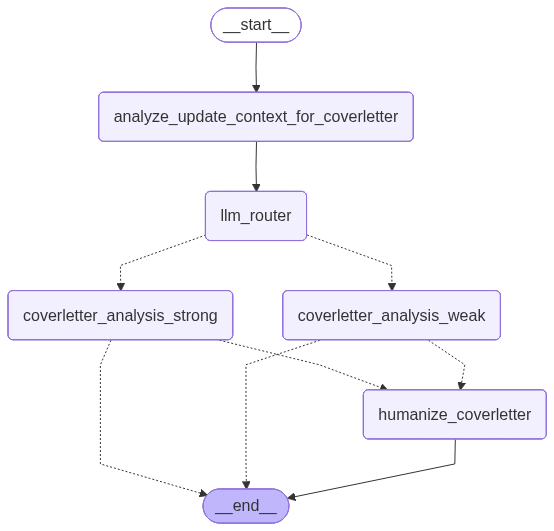
    from langgraph.checkpoint.memory import InMemorySaver
    from langgraph.graph import END, START, StateGraph

    from tweak.coverletter.nodes import CoverLetterNodes
    from tweak.coverletter.schemas import State

    class CoverLetterWorkflow:
        def __init__(self):
            self.checkpointer = InMemorySaver()

            # initiate graph state
            workflow = StateGraph(State)

            # initiate graph nodes
            cover_letter_nodes = CoverLetterNodes()

            # all nodes for cover letter
            workflow.add_node("analyze_update_context_for_coverletter", cover_letter_nodes.analyze_update_context_for_coverletter)
            workflow.add_node("llm_router", cover_letter_nodes.llm_router)
            workflow.add_node("coverletter_analysis_weak", cover_letter_nodes.coverletter_analysis_weak)
            workflow.add_node("coverletter_analysis_strong", cover_letter_nodes.coverletter_analysis_strong)
            workflow.add_node("humanize_coverletter", cover_letter_nodes.humanize_coverletter)

            # Define routing function for LLM selection
            def route_decision(state: dict) -> str:
                llm_type = state.get("llm_type", "weak")
                if llm_type == "strong":
                    return "coverletter_analysis_strong"
                else:
                    return "coverletter_analysis_weak"

            # Define routing function for humanizing
            def humanize_route_decision(state: dict) -> str:
                humanized_pro = state.get("humanized_pro_for_coverletter", False)
                if humanized_pro:
                    return "humanize_coverletter"
                else:
                    return END

            # all edges with conditional routing
            workflow.add_edge("analyze_update_context_for_coverletter", "llm_router")
            workflow.add_conditional_edges("llm_router", route_decision, {
                "coverletter_analysis_weak": "coverletter_analysis_weak",
                "coverletter_analysis_strong": "coverletter_analysis_strong"
            })
            workflow.add_conditional_edges("coverletter_analysis_weak", humanize_route_decision, {
                "humanize_coverletter": "humanize_coverletter",
                END: END
            })
            workflow.add_conditional_edges("coverletter_analysis_strong", humanize_route_decision, {
                "humanize_coverletter": "humanize_coverletter",
                END: END
            })
            workflow.add_edge("humanize_coverletter", END)

            # Set entry point
            workflow.add_edge(START, "analyze_update_context_for_coverletter")

            # Compile
            self.app = workflow.compile(checkpointer=self.checkpointer)
Will update soon………………………………….

